Overview
We are in the process of creating a website that displays facts and stories about the family history of our own families and of those of other close relatives. The content for the site is being authored as a set of DITA XML topics that can be combined using DITA maps and then posted to a website in WebHelp Responsive format.
Using a Python script, we are automating the process of creating DITA topics for key people in our Family Tree Maker (FTM) trees that contain basic facts like birth, death, and marriage dates and places.
The Python script also invokes an LLM to generate historical context for the birth fact by describing what was going on in the birth location at that time.
Although the details are not part of this post, it is worth mentioning that the topics also contain interesting stories about our ancestors that were not part of the FTM records, but were (for the most part) written by us, published as posts on our personal website, saved as PDF files in a family history / genealogy knowledge base, and summarized by the Perplexity AI assistant.
Processing overview and tools used
Here is the workflow we used in producing the DITA topics:
- We begin by exporting information for a selected set of people in a Family Tree Maker tree as a GEDCOM format file. We typically include data for a “home” person and their ancestors back to their great-grandparents.
- Next we convert the GEDCOM file to an equivalent XML file (for ease in later parsing) using a custom Python script. Each “0” level entry in the GEDCOM file is transformed into an element in the XML file, with relationships between entries in the GEDCOM preserved in the XML. Both this script and the next one make heavy use of the Python ElementTree XML library.
- A second custom Python script then fills in a template DITA concept file with facts and relationships for a person contained in the XML file. This includes adding links to the DITA files for relatives like parents and spouses.
- After this, we invoke an LLM to generate a section in the DITA file summarizes conditions at the person’s place of birth when they were born.
- We then create a DITA map file that includes <topicref> elements for all the individual person DITA topics. We use the Oxygen XML Editor to transform the map to WebHelp Responsive format. This results in a set of files that can be uploaded to a web server to produce a static web site that includes the functionality of the Bootstrap responsive front‑end framework.
- Optionally, we create a PDF file from the same DITA files as an archive of the website.
Use of AI tools
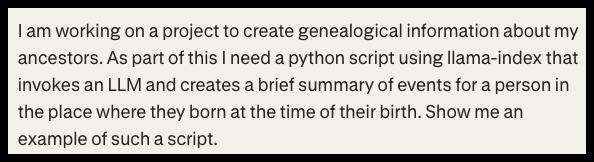
We used Perplexity AI to provide draft Python code to generate the summaries about the birthplace and its history. Here is the prompt we sent to Perplexity:
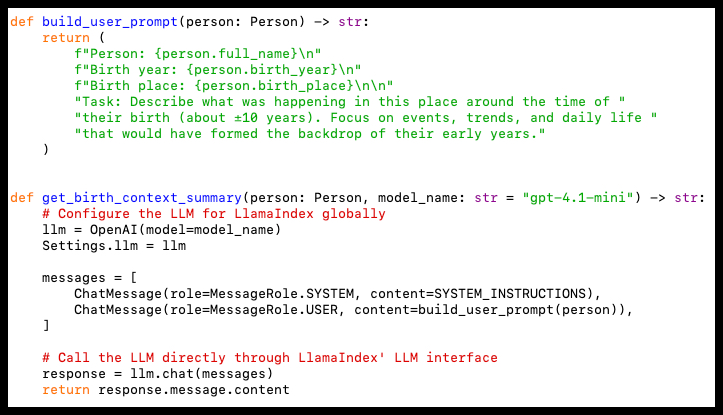
We got back from Perplexity the following code segment which was added to the Python script to add historical background text to the DITA file for each person.
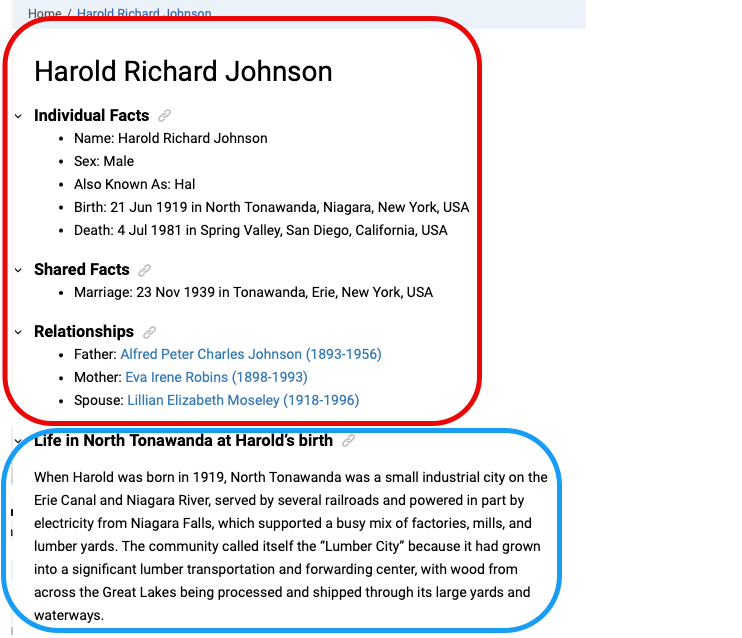
Example of a generated DITA topic
The screenshot below shows the final result of the DITA file for one of my ancestors. The part circled in red is information extracted from the GEDCOM data. The part circled in blue is a section created by the gpt-4.1-mini LLM that provides the historical context.